Task 08
Due Date:
Friday, 10/11 11:59pm
User Interaction Software
- Fall 2013
- Department of Informatics
- Donald Bren School of Information and Computer Sciences
Learn/refresh your Javascript skills
- Create an account on Codecademy. Add a profile picture to your account. We need this to help identify you when you turn in the assignment.
- Navigate to "Learn" -> "Javascript"
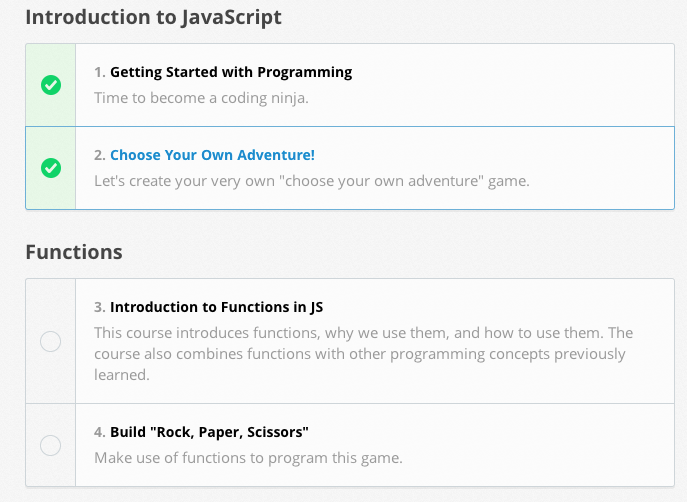
- There are 8 concepts in the Javascript lesson. For example, "Functions" and "'For' Loops in JavaScript". Each concept has an introduction and a small project. For example in the "Introduction to JavaScript" concept there is the introduction, "Getting Started with Programming", and the small project, "Choose Your Own Adventure!"
- For this assignment please complete 6 of the 8 introductions and 3 of the 8 small projects. You can choose which will be the most helpful for you. Naturally you can do more if you want.
- To repeat, do 6 of the following exercises:
- "Introduction" -> 1. "Getting Started with Programming"
- "Functions" -> 3. "Introduction to Functions in JS"
- "'For' Loops in Javascript" -> 5. "Introduction to 'For' Loops in JS "
- "'While' Loops in Javascript" -> 7. "Introduction to 'While' Loops in JS "
- "Control Flow" -> 9. "More on Control Flow in JS"
- "Data Structures" -> 11. "Arrays and Objects in JS"
- "Introduction to Objects I" -> 13. "Introduction to Objects I"
- "Introduction to Objects II" -> 15. "Introduction to Objects II"
- Additionally, do 3 of the following exercises:
- "Introduction" -> 2. "Choose Your Own Adventure!"
- "Functions" -> 4. "Build 'Rock,Paper, Scissors'"
- "'For' Loops in Javascript" -> 6. "Search Text for Your Name"
- "'While' Loops in Javascript" -> 8. "Dragon Slayer!"
- "Control Flow" -> 10. "Choose Your Own Adventure 2!"
- "Data Structures" -> 12. "Contact List"
- "Introduction to Objects I" -> 14. "Building an Address Book"
- "Introduction to Objects II" -> 16. "Building a Cash Register"
- Take a multiple screen shots as follows
- Your profile page, showing your % complete status and your avatar photo
- Screen shots showing that you completed the required modules. Your screen shot must include your avatar picture on the bar at the top.
- Put the screen shots on a web page like in task 03. The only thing on the web page should be your screen shots. (Unfinished Example)
- Turn in the URL of your screen shot using this EEE quiz.
- Each module should take you 15 to 45 minutes, so you should allow 2.5 to 7 hours to finish this assignment. It will be less frustrating if you plan on doing this assignment in several sessions rather than all at once, especially if you need to track down help on piazza.
- This task will be graded as an "assignment"